You’ve probably spent some time getting good at crafting AI prompts. You know how important clear wording, precise instructions, and giving enough initial context are to get the best results from tools like ChatGPT or Claude. This foundation is super valuable, but it only gets you so far when you step into the world of agentic AI.
When AI isn’t just spitting out a single reply but actually taking a series of actions—like searching the web, calling APIs, making decisions, or even handing tasks off to other AI sub-agents—the rules completely change. The skill set shifts from asking a question well to designing how an autonomous system genuinely thinks and operates.
This article is for developers, builders, and AI pros ready to go beyond simple chat interfaces. We’ll explore how prompting an AI agent differs from a chatbot, introduce the idea of “context engineering,” and lay out the core parts and thinking patterns that enable reliable, scalable AI agent behavior.
Chatbots vs. AI Agents: A Key Difference in Prompting
Think about talking to a regular chatbot. You type a prompt, it replies. If the answer isn’t quite right, you quickly tweak your input and try again. The feedback loop is instant and obvious. Your goal is one good response.
AI agents work differently. You give an agent a high-level goal, and it then plans, executes, and iterates through multiple steps to reach that goal. This involves using various tools, creating intermediate outputs, and making decisions along the way, all before delivering a final result.
The challenge? A fuzzy instruction at step one doesn’t necessarily cause an immediate, clear failure. Instead, it can lead to a subtle “drift” over several steps. By the time the agent is deep into a task, it might be diligently executing a plan based on an early misunderstanding – wasting valuable compute time and resources.
This ripple effect of your prompt is a major hurdle in agentic prompting. The initial wording impacts a long sequence of actions, not just one output.
The Problem of Context Rot
Adding to this complexity is something called context degradation or “context rot.” As an agent moves through a task, every tool call, every intermediate output, and every completed step adds tokens to its context window. Research suggests that as this context grows, the AI model’s ability to accurately remember and reason over that information can drop. An agent might effectively “forget” crucial rules stated at the beginning of a long task.
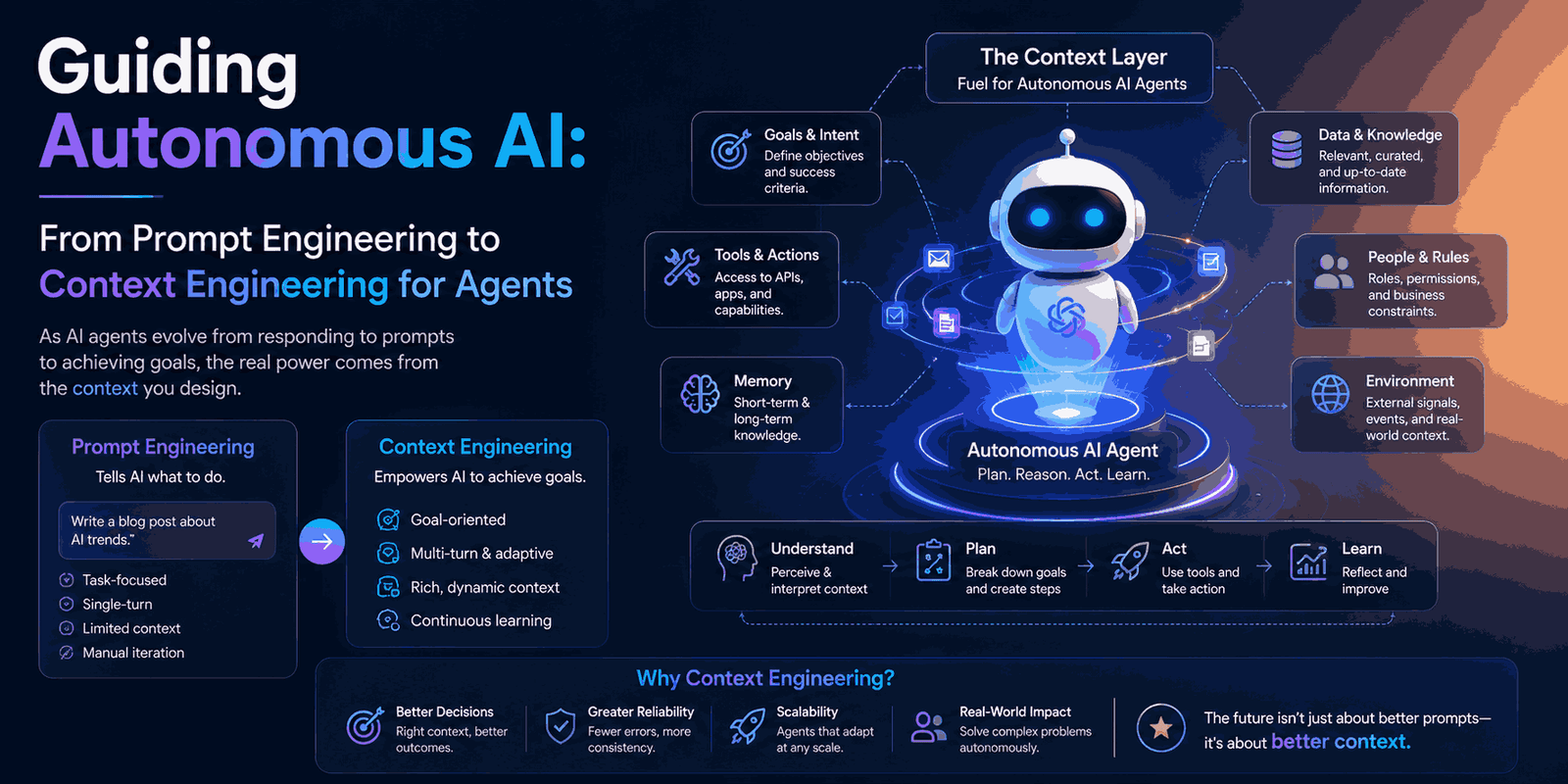
This is exactly why Anthropic’s engineering team coined the term context engineering. While traditional prompt engineering asks, “What are the right words to say?”, context engineering asks a broader, more architectural question: “What is the optimal set of information this model should have at every point during execution?” This shift is vital for building AI agents that behave consistently and reliably.
Building Blocks of Effective Agent Prompts: The Four Essential Components
To build strong AI agents, you need to purposefully design four categories of context. Ignoring any of these can lead to unpredictable behavior and failures. This framework, inspired by Lilian Weng’s work and Anthropic’s guidance, is key for LLM-powered agents.
The System Prompt: Your Agent’s Guiding Principles
The system prompt is the overall brief that directs your agent’s behavior throughout its entire task. It defines its role, lists available tools, outlines critical constraints, and specifies the expected output format. This is arguably the most impactful piece of text in your agent’s architecture, and it’s also easy to mess up.
Anthropic points out two common mistakes:
- Over-specification: Trying to hardcode every possible scenario with “if-else” logic. This creates fragile prompts that break when reality doesn’t perfectly match your script.
- Under-specification: Giving vague, high-level goals that assume the AI agent shares context it simply doesn’t have, leaving too much for the model to guess.
The sweet spot is what they call the “right altitude“: specific enough to guide behavior meaningfully, yet flexible enough to handle unexpected situations.
Weak System Prompt Example:
You are a helpful research assistant. Help the user with their research tasks.
Strong System Prompt Example:
You are a research assistant helping a B2B SaaS product team synthesize
competitive intelligence. You have access to a web search tool and a
file-writing tool. Your work will be reviewed by a product manager before
any decisions are made.

When given a research task:
1. Clarify the scope if the goal is ambiguous before starting.
2. Search for information from primary sources first (company websites,
   official announcements, earnings calls) before secondary sources.
3. Flag any information older than 12 months as potentially outdated.
4. Do not draw conclusions about competitor strategy -- report findings
   only and let the human interpret them.

Deliver a structured report with: Executive Summary (3-5 sentences),
Findings by category, and a Sources section with URLs. Format as Markdown.
The stronger version avoids scripting every action. Instead, it provides a clear role, behavioral rules, content prioritization, scope boundaries, and an output format. These are resilient heuristics, not rigid scripts.
Tools: Defining Capabilities with Precision
Every tool you give an agent represents a decision point and takes up part of its attention budget. Vague or overlapping tool descriptions can confuse the agent, making it hard to reliably decide which tool to use.
According to Anthropic’s insights, a common failure in production AI agents is having too many tools. If you, as a human, can’t instantly and clearly decide which tool applies to a given situation, your agent won’t either. Each tool should have a single purpose, a clear description, and parameters that are self-explanatory.
Weak Tool Description Example:
{
  "name": "search",
  "description": "Search for information"
}
Strong Tool Description Example:
{
  "name": "web_search",
  "description": "Search the public web for current information on a topic.
    Use this when you need facts, news, or data that may have changed recently
    or that is not in your training knowledge. Do NOT use this to retrieve
    documents already provided in the task context.",
  "parameters": {
    "query": "A specific, targeted search query of 3-8 words",
    "max_results": "Number of results to return (default: 5, max: 10)"
  }
}
The improved description clarifies not just what the tool does, but when to use it and, crucially, when not to. This helps the agent avoid unnecessary web searches for information it already has, saving time and tokens.
Examples (Few-Shot Prompting): Showing, Not Just Telling
Research consistently shows that providing concrete examples is often more effective than long lists of instructions for shaping an agent’s behavior. When an AI model sees a few clear input-output pairs (known as few-shot prompting), it can activate in-context learning. This allows it to identify underlying patterns and apply similar reasoning to new inputs more reliably than through natural language instructions alone.
For AI agents, examples are especially useful for showcasing the desired reasoning format, output structure, and decision-making style—not just the final answer. A good few-shot example for an agent should reveal its internal thought process.
Example: Two-Shot Prompt for a Data Analysis Agent
Example 1:
Input: "Summarize the sales data in Q1_sales.csv"
Thought: I need to read the file first to understand its structure
before summarizing anything.
Action: read_file("Q1_sales.csv")
Observation: File contains columns: Date,Region,Product,Revenue,Units.
547 rows covering January-March 2025.
Thought: Now I can summarize. I'll calculate totals by region and product,
then identify the top performer and any notable trends.
Output: [Structured summary with totals, top performers, and one key trend]

Example 2:
Input: "Compare our pricing to competitors"
Thought: This is too vague to act on -- I need to know which competitors
and which products before I start searching.
Output: "To compare pricing accurately, I need two things: which
competitors should I focus on, and which of your products should
I benchmark? Please clarify and I'll proceed."
Notice how Example 2 teaches the agent to recognize ambiguity and ask for clarification, a critical behavior that might not be obvious from instructions alone.
Context State Management: The Art of Just-in-Time Information
The message history—every prior turn, tool call result, and intermediate output—is often the primary cause of context rot in long-running AI agents.
Think of the transformer’s attention mechanism as an “attention budget.” Every token in the context window competes for the model’s focus. As this budget stretches with growing context, the model’s precision for information retrieval and long-range reasoning can measurably decrease.
The practical takeaway: carelessly dumping all intermediate steps and full tool results into the context window can make your agent less intelligent as a task progresses.
A better approach is just-in-time context. Instead of front-loading all potentially relevant data, agents maintain lightweight references (like file paths or URLs) and fetch specific information only at the precise moment it’s needed. For instance, tools like Claude Code manage large codebases by storing file paths and performing targeted reads, ensuring the model sees only the directly relevant files at each step. This keeps the active context lean and focused.
Reasoning Architectures: Making AI Agents Think Smarter
What you put in the prompt is important, but how you structure an agent’s internal reasoning is equally critical. Early research by Google showed a dramatic increase in problem-solving success by simply giving an AI model a structured way to reason, rather than just relying on a model upgrade. The architecture of its thought process made the difference.
Chain of Thought (CoT): The Power of Step-by-Step Thinking
Chain of Thought (CoT) prompting is the simplest and most foundational architectural upgrade. Instead of directly generating an answer, the AI model explicitly generates its reasoning steps before committing to an output.
Simply adding phrases like “Let’s think step by step” to a prompt can significantly boost accuracy on multi-step problems. This activates a reflective reasoning mode. The AI externalizes its working, which not only improves accuracy but also makes its reasoning visible and auditable—a major plus for high-stakes applications.
Basic CoT Prompt Addition:
You are a financial analysis agent.
When given an analysis task, always think through the following before
producing output:
- What data do I have, and what data is missing?
- What assumptions am I making that could be wrong?
- What is the most likely interpretation of this data?
- What would change my conclusion?
Then produce your analysis based on that thinking.
For CoT to be most effective, tailor the reasoning structure to the specific task. Financial analysis requires a different thinking framework than, say, debugging code or conducting competitive research.
ReAct (Reason + Act): Grounding Actions in Reality
ReAct is a prominent pattern for AI agents that interact with tools. Its name comes from its core loop: Thought → Action → Observation → Thought. The agent first reasons about what to do next, then takes an action using a specific tool, observes the result of that action, and finally reasons again based on what it learned. This cycle continues until the task is complete.
ReAct is powerful because it grounds the agent’s reasoning in actual evidence. Instead of making assumptions, the model is forced to test its hypotheses against real-world tool outputs at each step, significantly reducing the chance of hallucinated or incorrect answers.
ReAct Prompt Template:
You are a research agent with access to web_search and save_file tools.
Work through tasks using this loop:

Thought:[Reason about what you know and what you need to find out next]
Action:[Choose a tool and specify exactly what to do with it]
Observation:[This will be filled in with the tool result -- do not write this yourself]
Thought:[Reason about what the observation tells you and what to do next]
...repeat until complete...
Final Answer:[Deliver the completed output]

Never skip the Thought step. Never take an Action without a Thought that
justifies it. If an Observation is unexpected, reason about why before
deciding how to proceed.
Example of the ReAct Loop in Action:
Task: "Find the current pricing for Notion's Team plan and compare it
to Coda's Team plan."

Thought: I need current pricing for both products. I'll search for each
separately to get accurate, up-to-date figures rather than relying on
my training data.
Action: web_search("Notion Team plan pricing 2025")
Observation: Notion Team plan is $16/user/month billed annually,
$20/user/month billed monthly as of March 2025.
Thought: I have Notion's pricing. Now I need Coda's.
Action: web_search("Coda Team plan pricing 2025")
Observation: Coda Team plan is $30/user/month billed annually.
Thought: I have both data points. Notion is significantly cheaper at
annual billing. I should note when each price was verified.
Final Answer: [Structured comparison with pricing, billing options,
and date of data retrieval]
This structured loop ensures the agent actively interacts with its environment and updates its reasoning based on real-world feedback.
Reflexion (Self-Correction): Building Agents That Learn from Mistakes
Reflexion builds on ReAct by adding a crucial self-correction mechanism. After completing a task or a significant step, the agent evaluates its own output against the original goal. It actively identifies specific failures, gaps, or inconsistencies and then generates a revised plan before proceeding or delivering a final result. This empowers AI agents to catch and correct their own mistakes, reducing the need for constant human oversight.
Reflexion Prompt Addition:
After completing each major task step, before moving to the next one,
run a self-check:

Reflection:
- Does this output fully address what was asked?
- Are there any claims I made that I cannot verify from the data I retrieved?
- Did I miss any constraints stated in the original task?
- If I were the human reviewing this, what would I flag?

If you identify a gap or error, correct it before proceeding.
State what you found and what you changed.
Reflexion in Practice:
[Agent completes a first draft of a competitor analysis report]
Reflection: Reviewing against the original task -- the user asked for
pricing, feature comparison, AND market positioning. I covered pricing
and features, but I did not address how each competitor positions
themselves in marketing materials. That section is missing.
Correcting: Running an additional search on each competitor's homepage
and recent press releases to capture positioning language before
delivering the final report.
Action: web_search("Competitor A positioning messaging 2025")
...
Reflexion is especially valuable for tasks where accuracy and completeness are paramount, such as reports, detailed analyses, or structured documents. While it adds some latency, it significantly reduces the likelihood of incomplete or inconsistent outputs reaching the end user.
Practical Strategies for Context Engineering
Understanding the theory behind context engineering is a great start, but applying it to the prompts you write is where the real work happens. Here are some impactful practical moves:
Optimize Your System Prompt for the “Right Altitude”
Avoid both over-specifying and under-specifying. Instead of trying to script every decision an agent might make (which often looks like a natural language flowchart), provide clear principles. For example, rather than “if X, do Y; if Z, do W,” use a principle like: “Prioritize accuracy over speed. When in doubt, retrieve fresh data rather than relying on prior context.” This gives the agent guidance while allowing it flexibility.
Write Outcome-Oriented Prompts, Not Procedure Lists
Focus on defining the desired end product rather than dictating every single step. Procedure lists can limit an agent’s ability to adapt when a step doesn’t go exactly as expected—which is common in multi-step tasks.
Fragile Procedure List:
1. Open the CSV file
2. Find the revenue column
3. Sum the values by region
4. Write a paragraph describing the results
5. Save the output as report.docx
Resilient Outcome Prompt:
Analyze the sales CSV in the working directory. Produce a Word document
with: total revenue by region, the top-performing region with a brief
explanation of why it stands out, and any data quality issues you noticed
(missing values, inconsistent formatting). Save as report.docx
The outcome-based prompt empowers the agent to figure out how to achieve the goal, adapting if the CSV has unexpected columns or data formatting.
Embrace Just-in-Time Context Retrieval
Resist the urge to pre-load all potential background documents, session history, or reference data into the agent’s context window. This often degrades performance on longer tasks due to context rot. Instead, design your agent to maintain lightweight references (like file paths or database query IDs) and fetch specific information only when it’s immediately relevant to the current step.
Your system prompt should point to where information lives, not contain the information itself:
## Data Access
Customer data is stored in /data/customers.csv.
Product catalog is in /data/products.json.
Do not load these files upfront. Load only the specific rows or fields
relevant to the current step of the task using the read_file tool with
targeted queries.
This strategy keeps the active context lean, preserving the agent’s attention budget for crucial reasoning.
Leverage Dynamic Persona Priming
A single AI agent architecture can serve diverse users if you inject context-specific persona information at runtime. This is particularly useful for agents that need to adapt their tone, depth, or level of technical detail based on the user’s role or background.
Runtime Injection Example:
# Injected based on user role at session start
# For a non-technical user:
role_context="""
The user is a business stakeholder with no technical background.
Explain findings in plain language. Avoid jargon. Use analogies
where helpful. Never show raw data -- always interpret it first.
"""

# For a technical user:
role_context="""
The user is a senior data engineer. Use precise technical terminology.
Include relevant SQL or code snippets where they add clarity.
Focus on implementation details over high-level summaries.
"""

system_prompt = base_system_prompt + "\n\n" + role_context
This allows one underlying agent to produce vastly different outputs for different user types without needing to maintain separate agent instances or prompt files.
Architecting Multi-Agent Systems
Some complex tasks are just too much for a single AI agent. These often involve parallel workstreams, require specialized knowledge in multiple areas, or demand built-in checks and balances. For these scenarios, multi-agent systems are more effective. A common setup involves an orchestrator agent that receives the main goal, breaks it down into subtasks, delegates these subtasks to specialized worker agents, and then synthesizes their results.
Prompting a multi-agent system means crafting individual prompts for each agent and carefully designing how they hand off tasks to each other. Each agent needs to understand its specific responsibility, what input it expects, and what output it must deliver. Crucially, it doesn’t need to understand the entire system architecture, only its distinct role.
Orchestrator System Prompt Example:
You are a research orchestration agent. Your job is to coordinate
a team of specialized agents to complete research tasks.

You have access to three worker agents:
- search_agent: Retrieves information from the web.
  Send it: a specific search objective and the output format you need.
- analysis_agent: Analyzes data and identifies patterns.
  Send it: structured data and a specific analytical question.
- writer_agent: Produces polished written outputs.
  Send it: structured findings and the target document format.

Your responsibilities:
- Break the user's task into clear subtasks for each agent.
- Specify exactly what each agent should deliver before you delegate.
- Validate that each agent's output meets the spec before passing
  it to the next agent.
- Synthesize the final output from all agent results.

Do not attempt to do any of the specialized work yourself.
Worker Agent System Prompt (search_agent) Example:
You are a specialist search agent. You receive a specific search
objective from an orchestrator and return structured research findings.

Input you will receive:
- A clear search objective.
- The output format required (e.g., bullet points, JSON, table).

Your responsibilities:
- Execute targeted web searches to fulfill the objective.
- Return only information that directly addresses the objective.
- Flag any information that is older than 6 months.
- Do not interpret or editorialize -- return findings only.

You do not need to understand the larger task. Focus entirely on
the search objective you were given.
The principle of minimal shared context is vital here. Each worker agent receives only the information necessary to perform its specific job. This keeps each agent’s context focused, reduces cross-contamination, and simplifies debugging.
Avoiding Common Pitfalls in Agent Prompt Design
Even with good intentions, agent prompts can fail for predictable reasons. Here are five common mistakes and how to address them:
- Too Many Tools: While more tools might seem like more capability, they often create confusion. If multiple tools could reasonably apply to the same situation, the agent may hesitate, choose inconsistently, or use the wrong one.
- Fix: Regularly review your toolset. If you can’t instantly and clearly figure out which tool applies to a given scenario, prune or refine until you can.
- Vague Success Criteria: An agent that doesn’t clearly understand what “done” looks like will struggle to complete tasks effectively. Vague instructions like “complete the analysis” invite misinterpretation.
- Fix: Every task specification should clearly define the output format, expected content, and any conditions that must be met before the agent considers itself finished.
- Overloaded Context: Stuffing all background documents, prior history, and reference data into the context window will degrade performance on longer tasks as the attention budget stretches thin.
- Fix: Implement just-in-time retrieval. Load specific data only at the moment it’s needed, rather than all at once at the start.
- No Examples: Instructions tell an agent what to do, but examples show it what success looks like.
- Fix: For any repeatable task pattern, two or three well-chosen examples are often more valuable than pages of instructions. They help the model infer format, tone, decision style, and output structure more effectively.
- Treating a Multi-Step Agent Like a One-Shot Chat: Chatbot prompts can be vague because a human is there to correct in real-time. An autonomous agent, however, executes across many steps without human intervention until the final output. Every ambiguity you leave in the prompt becomes a decision the agent makes independently, which then compounds through subsequent steps.
- Fix: Invest more time in the upfront design of your agent prompts. This pays off in fewer failed runs and more reliable, consistent outputs.
Final Thoughts
Prompt engineering for agentic AI isn’t just an advanced version of chat prompting; it’s a distinct discipline with a different core idea. Chat prompting aims to get a good response, while context engineering focuses on designing a reliable, autonomous system. This system must make consistent decisions across multiple steps, effectively use tools, manage its own attention, and deliver finished work without needing constant human guidance.
The most successful teams building with AI agents are moving beyond asking, “How do I phrase this better?” and are instead asking, “What critical information does this model need at every step to behave exactly as I intend?” This shift from focusing solely on wording to a more architectural approach to context is where true leverage lies.
Start by crafting system prompts that operate at the “right altitude.” Provide your agent with well-defined, unambiguous tools. Use few-shot examples to illustrate the desired reasoning and output styles. And, crucially, design your agent’s context management to remain lean and focused throughout the task. Embracing these practices will significantly enhance the reliability and effectiveness of your AI agents.
Looking to dive deeper into agent design? Exploring resources like Anthropic’s insights on context engineering or comprehensive guides on ReAct and Reflexion can provide further practical knowledge for your journey into building intelligent, autonomous AI systems.
Ready to build your own intelligent AI agents? Share your agent-building experiences or challenges in the comments below!